
Nama : Hilma Aulia Daffa
NIM : 2581494366
Pertanyaan:
- Explain the “Shared Responsibility Model.” What is the cloud provider responsible for, and what is the business (customer) responsible for?
- What is a cloud misconfiguration, and can you provide an example (e.g., a public S3 bucket)?
- Why are Identity and Access Management (IAM) policies so critical in a cloud environment?
Jawaban:
1.
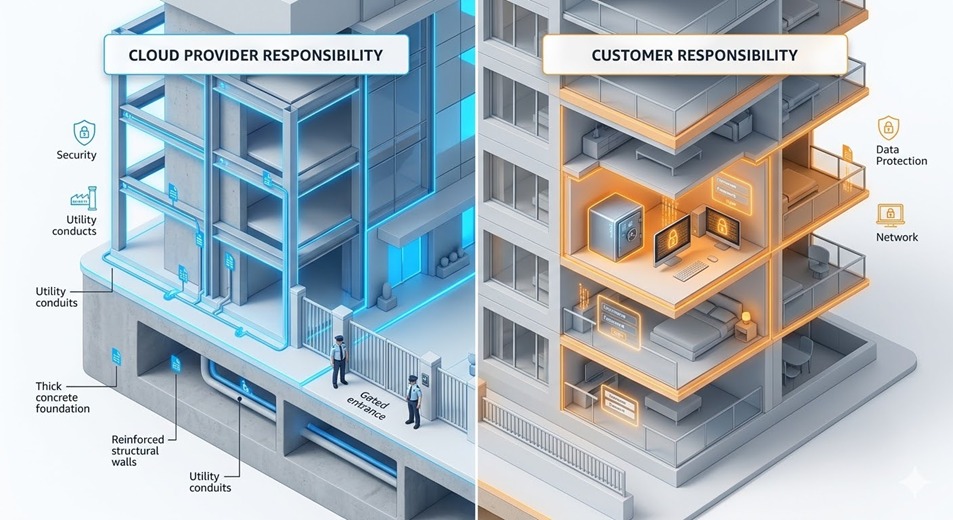 Understanding the Shared Responsibility Model in Cloud Security
When we talk about cloud security, it’s easy to assume that once you move your data to a provider like AWS or Google Cloud, they handle everything. But in reality, it doesn’t work that way. There’s this concept called the “Shared Responsibility Model” which basically says that security is a two-way street. It’s a partnership where both the provider and the business have specific roles to play, and if one side drops the ball, the whole system becomes vulnerable.
The Provider’s Side: Security “Of” the Cloud
Think of the cloud provider the AWSs and Azures of the world—as the landlord of a high-tech building. Their job is to make sure the building itself is solid. This means they are responsible for the physical security of the data centers, the actual hardware like servers and networking cables, and the software layers that keep the cloud running. They handle the “Security of the Cloud.” Essentially, they provide a secure foundation so that you don’t have to worry about someone literally walking into a server room and unplugging your database.
The Customer’s Side: Security “In” the Cloud
Then there’s our side as the customers—the “Security in the Cloud.” This is where things get a bit more hands-on. Even though the “building” is secure, we are responsible for what we put inside our “apartment.”
If you’re running virtual machines, you’re the one who has to patch the operating system and set up the firewalls. You have to decide who gets access through IAM (Identity and Access Management) and, most importantly, you’re the owner of your data. If that data isn’t encrypted or if the access permissions are too loose, that’s on the customer, not the provider.
The interesting part is that these responsibilities actually shift depending on the service model you use. If you’re using IaaS (Infrastructure as a Service), you’re doing a lot of the heavy lifting. But if you move to SaaS (Software as a Service), the provider takes over more of those layers, leaving you mostly responsible for just the data and user access. It’s never a “set it and forget it” situation; it’s about knowing exactly where their job ends and yours begins.
2. .png)
Cloud misconfiguration is basically a fancy way of saying someone messed up the settings on a cloud service. It’s usually not a technical glitch or a “bug” in the cloud provider’s system—the platform itself is usually fine. The real issue is almost always on our end as users. Because cloud environments are getting so complex, it’s honestly pretty easy to overlook a default setting or click the wrong toggle, leaving a whole database or server wide open to anyone who knows where to look. It’s a human error problem, plain and simple.
To put this into perspective, think about what happens with Amazon S3 buckets. We’ve all seen headlines about massive data leaks, and half the time, it’s just because a bucket containing private customer info was accidentally set to “Public.” Someone might have been trying to share a folder with their team and thought they were just tweaking internal permissions, but they ended up removing the authentication requirement entirely. Suddenly, anyone with the URL has a front-row seat to sensitive data. It’s a classic example of how a small, seemingly minor oversight in configuration can turn into a massive security nightmare.
3. .png)
In a cloud-based environment, Identity and Access Management (IAM) isn’t just an administrative tool; it’s basically the core of your security. We have to realize that the old-school way of protecting data—relying on physical firewalls or a “secure” office network—doesn’t really cut it anymore. Since everything in the cloud is accessible over the internet, identity becomes the new perimeter.
.png)
This is where IAM policies come in to enforce the principle of least privilege. It sounds simple, but it’s actually the most effective way to make sure that no user or service has more power than they actually need to do their job.
If we get these policies wrong, the fallout can be massive. For one, if an account gets hacked and it has “admin-level” access it doesn’t need, you’re basically giving an attacker a master key to the whole kingdom. They can wipe out infrastructure or leak sensitive data before anyone even notices. But it’s not just about hackers; we also have to account for human error. A well-meaning employee with too much access can accidentally delete a production database just as easily as a malicious insider could.
Beyond just blocking bad actors, there’s also the issue of accountability. Without granular policies, your audit logs become a mess. You end up in a situation where you know something went wrong, but you can’t pinpoint who did what or when. By shifting to an identity-centric approach, we’re not just checking a compliance box—we’re creating a system where every action is traceable and every permission is intentional.